
INSTAGRAM ALT TEXT AND WHY YOU SHOULD BE USING IT…
What is ALT text?
Why we should be using Instagram ALT text
How do you implement ALT text in Instagram?
At the beginning of 2019 Instagram launched a brand new feature…The Instagram ALT text. We think that this is a MASSIVE big deal yet so many instagram users are still yet to jump on this amazing feature. In todays blog post we are going to explain exactly why each and every business shoud be using Instagram ALT tags and we’ll show you exactly how to do it.
WHAT IS ALT TEXT?
Quite simply, ALT text or ALT tags is short for “alternative” text. Its commonly used when optimising images across all of our online content to give context and understanding to what our images are about. It should descriptive and can include your keywords but ultimately explain exactly what is showing up on the page. If you’re not including ALT tags on your regular online content you are missing out on so much potential traffic!
WHY SHOULD WE BE USING INSTAGRAM ALT TEXT?
There are 3 MASSIVE reasons why you should start using ALT text today, without any delay.
1. Accessibility. It helps visually impaired online users access your content. Screen readers literally use ALT texts to describe what is happening for their users. By creating a more accessible instagram feed you are opening yourself up to a wider instagram community of people who can engage with you.
2. It helps you work with the beloved Instagram Algorithm. By explaining in black and white exactly what it is your post is about you will help the powers that be at Instagram know where to put your content.
3.Its allowing you to optimise your instagram content for SEO. The most exciting development in our opinion!! Finally there is a way to optimise your content for Google to help rank your content far beyond the social media platform. We’ve talked long and hard about your Google keyword strategy. You should be applying this to your Instagram SEO strategy too.
HOW TO ADD INSTAGRAM ALT TEXT TO YOUR POSTS
Including ALT text couldnt be simpler and takes no time at all to do. When creating a new post take the following steps…
1. Upload your image and write your caption as normal.
2. At the bottom of the screen hit the “advanced settings” button.
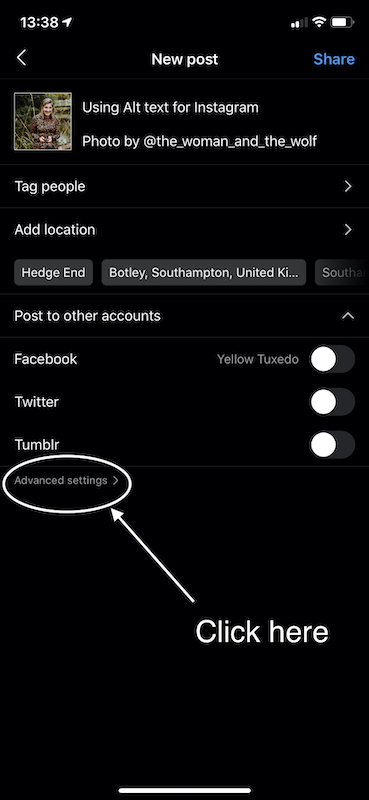
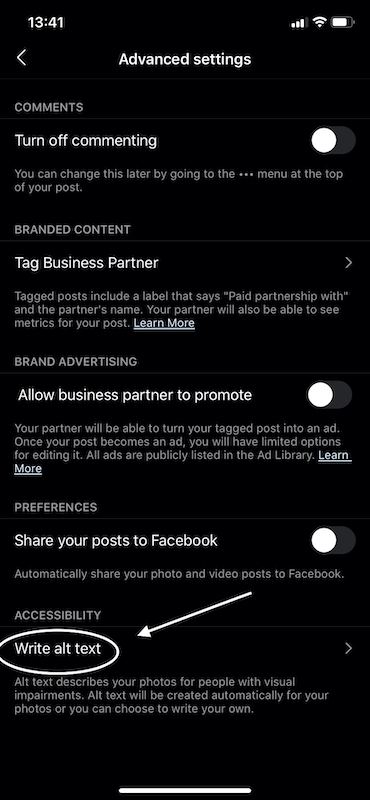
3. Click on “Write alt text” and include your descriptive alternative text. [ be sure to include keywords if you want] This is not seen by the end user.
4. Post as normal. DONE!
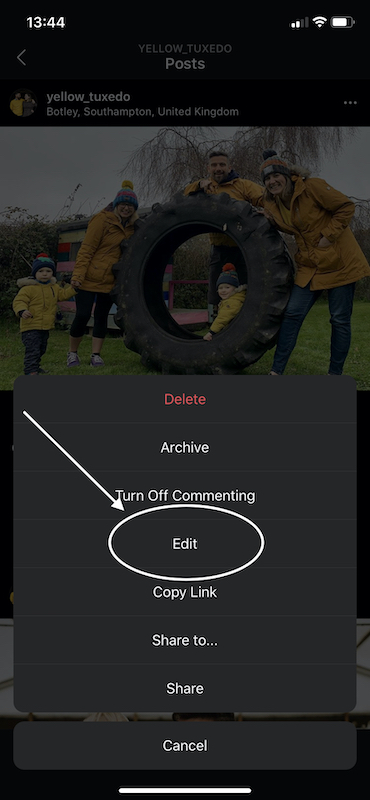
To go back and edit ALT text on historic posts its just as simple. Click the 3 dots top right of the post and click edit.
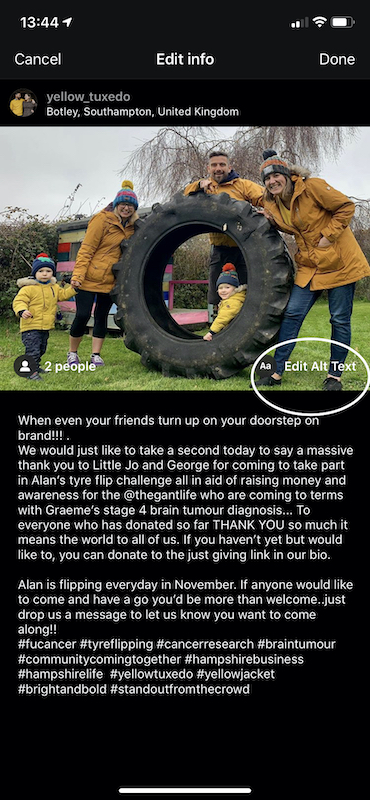
in the bottom right corner of the image it will say “alt text” if you click there you can include the text as before and re-save.
We hope you’ve found this post useful and that it might encourage you to make use of this awesome instagram feature to help improve your online visibility. As always, if you have any questions be sure to post them in the comments of get in touch with us via our contact page if you’d like some help to get started.
Emily x
No Comments
Leave a Comment
Fancy our newsletter?

I love the step be step graphics but my insta pages are not the sane as yours! Feeling very 20th century!
Ah that’s frustrating…be sure to update your app and if that fails it might be that IG are just rolling out the new features in waves across accounts. Keep your eyes peeled!